
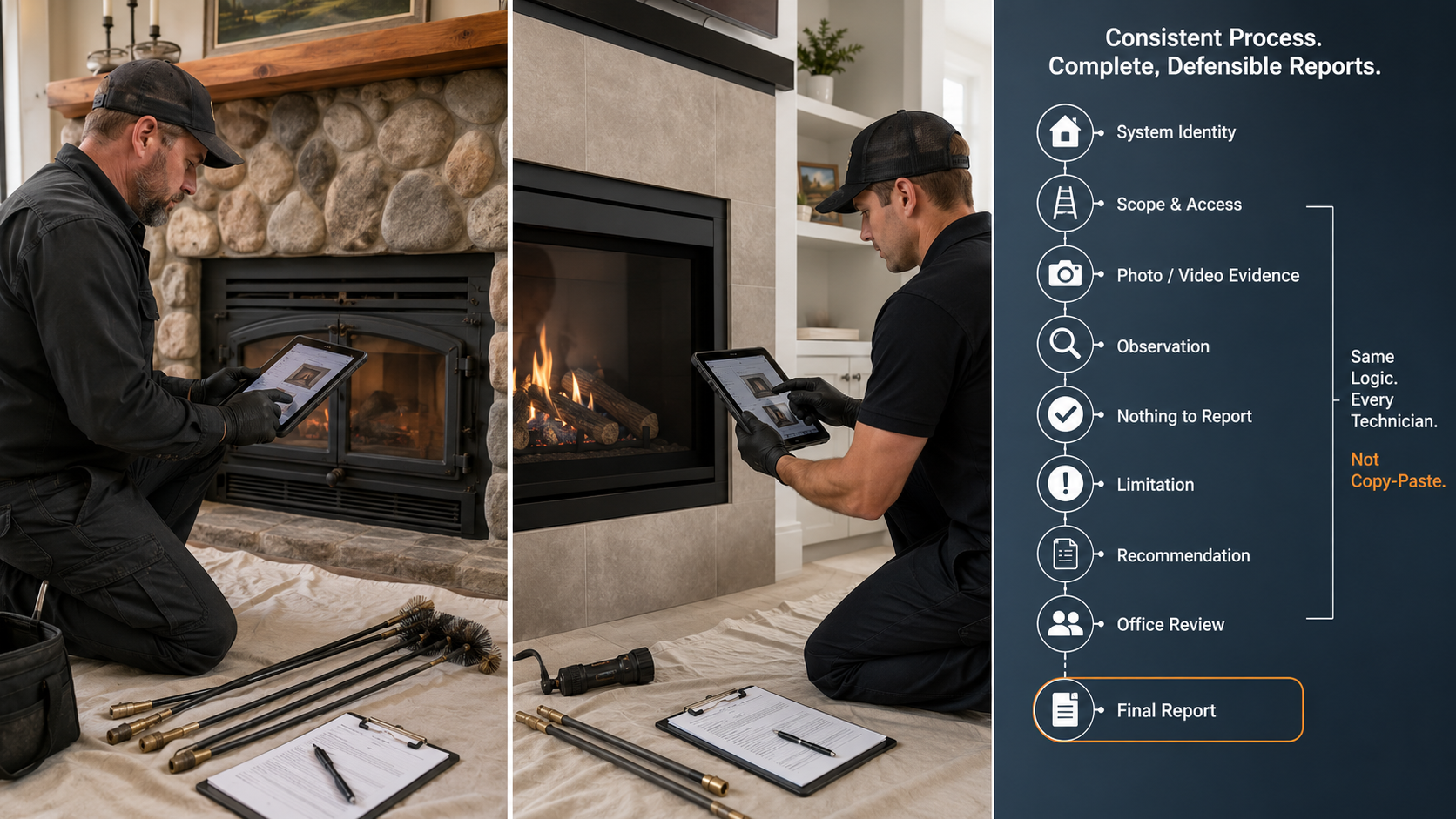
A multi-technician chimney company does not need every inspector to sound like the same person.
It does need every report to follow the same professional logic.
That distinction matters.
A good inspection report should reflect the technician’s actual observations, the actual system inspected, the actual access available, and the actual limitations encountered. But the company should not have one technician documenting a masonry fireplace one way, another documenting a factory-built fireplace another way, and a third uploading photos into a disconnected gallery with unclear recommendations.
That is not professional variation.
That is documentation drift.
For chimney, fireplace, venting, and appliance inspections, software should not merely help technicians write faster. It should help the company document inspections consistently without turning professional judgment into a copy-paste exercise.
Consistency Does Not Mean Identical Reports
Report consistency is often misunderstood.
Some companies hear “standardized reporting” and think it means every technician must use identical canned language regardless of the site conditions.
That is not the goal.
Professional consistency means the report follows a repeatable structure:
- the system is identified clearly;
- the inspection level or scope is stated;
- the reason for inspection is documented;
- applicable sections are included;
- non-applicable sections are marked appropriately;
- inaccessible or limited areas are not silently skipped;
- photos and video evidence are tied to the correct system;
- observations are stated clearly;
- recommendations follow logically from the observed conditions;
- “Nothing to Report” is used only where it actually applies.
That structure can be consistent while still allowing the technician to document the field reality.
The goal is not to make every report identical.
The goal is to make every report understandable, complete within its scope, and defensible.
The Real Problem: Technician Variation
In a single-inspector company, reporting habits may live in one person’s head.
In a multi-technician company, those habits become operational risk.
One technician may document limitations carefully. Another may only document defects. One may attach every photo to the correct system. Another may upload all photos at the end. One may write clear recommendations. Another may use vague phrases like “needs repair” without explaining what condition supports that recommendation.
Common variation includes:
- different names for the same system;
- inconsistent Level I and Level II language;
- missing reason-for-inspection details;
- inconsistent use of photos;
- unclear separation between multiple fireplaces or flues;
- skipped sections without status language;
- “Nothing to Report” used where the area was actually inaccessible;
- recommendations not tied to observed conditions;
- office staff forced to interpret field notes after the technician leaves.
This variation creates more than formatting problems.
It affects client understanding, office review, repair planning, referral quality, insurance communication, and professional credibility.
What Chimney Inspection Software Should Standardize
A strong chimney inspection workflow should standardize the structure of the inspection record.
That does not mean the software should dictate the conclusion. It means the software should require the technician to document the right categories of information before the report is finished.
At minimum, the workflow should standardize:
- System identity
The report should identify the fireplace, chimney, vent, flue, appliance, or connected system being inspected. - Inspection level or scope
The report should state whether the work was Level I, Level II, limited visual, consultation, post-event evaluation, repair follow-up, or another defined service. - Reason for inspection
The reason matters. Annual use, real estate transfer, appliance change, performance complaint, chimney-fire concern, insurance review, or repair planning can create different documentation expectations. - Section status
Sections should not simply disappear. A section may be included, excluded, limited, inaccessible, not applicable, or marked Nothing to Report. - Observations and Observed Conditions
When a reportable condition exists, the software should help the technician place it in the correct system and section. - Photo and video evidence
Visual evidence should stay attached to the correct system, section, observation, limitation, or recommendation. - Recommendations
Recommendations should be practical next steps tied to the observed condition and inspection scope. - Final review
The technician or office reviewer should be able to review the report before delivery without reconstructing the inspection from loose notes and photos.
That is the difference between a report writer and an inspection workflow.
What Should Not Be Standardized
Not every part of the inspection should be reduced to a fixed answer.
A professional chimney inspection still requires judgment.
Software should not pretend that every masonry fireplace, factory-built fireplace, wood stove, gas insert, pellet appliance, furnace vent, boiler vent, or dryer vent follows the same path.
The software should not force a false conclusion.
It should not require a technician to mark a section as “acceptable” when the better answer is:
- limited;
- inaccessible;
- excluded;
- not applicable;
- further evaluation recommended;
- observed condition documented;
- Nothing to Report.
The best workflow gives the technician enough structure to avoid omissions and enough flexibility to document field reality.
That is especially important in older homes, resort properties, multi-flue chimneys, shared chases, concealed construction, missing labels, restricted roof access, snow/ice conditions, and systems with prior repairs or modifications.
System Identity Comes First
Many report problems begin before the technician writes the first observation.
They begin when the report does not clearly identify the system.
A property may have:
- a living-room masonry fireplace;
- a primary-bedroom factory-built fireplace;
- a basement wood stove;
- a furnace vent;
- a gas fireplace insert;
- a pellet appliance;
- multiple flues in one masonry chimney;
- multiple factory-built systems in a common chase.
If the software treats all fireplace and chimney information as one general section, the report can become ambiguous.
Which flue was scanned?
Which appliance was connected?
Which fireplace had the observed condition?
Which recommendation applies to which system?
Which photos belong to which chimney?
A multi-technician company cannot rely on memory or office interpretation to answer those questions later. The workflow should require system identity before observations, photos, limitations, and recommendations are added.
That one step improves the entire report.
Observations, Observed Conditions, Nothing to Report, and Limitations
InspectionFire terminology should support the actual inspection decision.
A section should not have only two choices: “defect” or “no defect.”
That is too crude for chimney documentation.
A better structure includes:
- Observation: something the inspector observed and documented in the report;
- Observed Condition: a physical or technical condition documented in the system;
- Nothing to Report: the section was included and observed within the applicable scope, but no reportable condition was documented;
- Limitation: the section was included or applicable, but visibility, access, safety, configuration, debris, construction, weather, or scope restricted the inspection;
- Inaccessible: the section could not be accessed under the conditions present;
- Not Applicable: the section does not apply to the system;
- Excluded: the section was outside the agreed scope or intentionally excluded.
This vocabulary matters.
“Nothing to Report” should not be used when the technician did not inspect the area.
If the area was not inspected, the report should say why.
That is not just better writing. It is better documentation.
Photo and Video Evidence Must Stay Connected
Photo documentation is one of the clearest places where multi-technician variation shows up.
Some technicians take too few photos.
Some take many photos but do not label them.
Some photograph every observed condition but forget limitation photos.
Some capture chimney-camera footage but do not tie still images to the correct system or recommendation.
Some document a general image scan but do not state whether the scan was complete, limited, blocked, or only partially performed.
The problem is not merely how many photos are taken.
The problem is whether the photo evidence remains connected to the inspection record.
A strong workflow should help the technician connect photo and video evidence to:
- the system;
- the section;
- the location;
- the observed condition;
- the limitation;
- the recommendation;
- the final report.
A photo without context may look useful, but it can still leave the client, office, Realtor, insurer, or future technician guessing.
Office Review Should Not Reconstruct the Inspection
In many companies, the office becomes the hidden report-quality department.
That may be necessary.
But the office should not have to reconstruct the inspection from scratch.
If the field workflow is weak, the office reviewer may have to determine:
- which photos belong to which system;
- whether the technician inspected the attic;
- whether an internal chimney camera inspection was completed;
- whether a section was skipped or not applicable;
- whether a recommendation was intentional;
- whether the report should restrict use;
- whether a client question requires a callback to the technician.
That costs time and creates risk.
A better software workflow allows the technician to document the inspection correctly in the field, then allows the office to review, polish, and approve the report.
The office should be checking the report.
It should not be rebuilding the inspection.
Why This Matters in Level I and Level II Workflows
Level I and Level II inspections are especially sensitive to report consistency because the inspection level affects the access threshold and documentation expectations.
A Level I inspection and a Level II inspection should not be treated as two generic forms.
The better question is:
Given this system, this reason for inspection, this inspection level, and these site conditions, which sections apply, which sections were inspected, which sections were limited, and which recommendations follow?
That is a workflow question.
A Level II inspection may include accessible attic, crawlspace, basement, roof, appliance-connection, chimney-exterior, chimney-interior, and internal image-scanning considerations where applicable and possible. But it still does not mean every concealed area is automatically evaluated or that every scan is complete regardless of access, geometry, debris, offsets, or safety.
For a multi-technician company, this matters because Level II language must remain consistent.
One technician should not imply that all concealed areas were evaluated while another clearly states access limitations. One should not call an internal camera inspection a complete inspection when another properly documents what was scanned, what was not scanned, and what limited the scan.
The company needs a shared framework.
Why This Matters for Home Inspectors Adding Chimney Services
Home inspectors face a separate consistency problem.
A general home inspection may include visible fireplace and chimney observations. That does not automatically mean the inspector performed a chimney-specific Level I or Level II inspection.
If a home inspection company adds chimney inspections as an ancillary service, the report workflow has to become more formal.
The inspector should be able to separate:
- general visible fireplace observations;
- chimney referral recommendations;
- limited visual fireplace notes;
- Level I chimney inspection work;
- Level II chimney inspection work;
- image-scanning documentation;
- inaccessible or excluded areas;
- recommendations before use or before closing.
That separation is important because the reader should not be left guessing whether the inspector merely observed a visible condition or performed a chimney-specific inspection.
For multi-inspector home inspection companies, this is even more important. One inspector’s fireplace note should not imply a Level II chimney inspection when another inspector correctly recommends further evaluation by a qualified chimney professional.
Software should help maintain that boundary.
How InspectionFire Supports Team Consistency
InspectionFire is built around guided chimney, fireplace, venting, and appliance documentation.
For multi-technician companies, the value is not just faster report writing.
The value is a repeatable inspection workflow.
InspectionFire helps standardize:
- system setup;
- inspection level;
- inspection reason;
- guided sections;
- photo and video documentation;
- Observations;
- Observed Conditions;
- Nothing to Report;
- Limitations;
- Recommendations;
- final PDF report output;
- team-wide report consistency.
That does not remove professional judgment.
It organizes it.
A technician still has to inspect the actual system, evaluate the actual condition, and document the actual limitation. The software simply makes it harder for important information to be missed, buried, skipped, or separated from the final report.
That is the difference between using software as a typing tool and using software as an inspection system.
Bottom Line
Multi-technician chimney companies do not need copy-paste reports.
They need consistent inspection logic.
The report should identify the system, define the scope, document access, preserve evidence, distinguish Nothing to Report from limitations, state observations clearly, and connect recommendations to observed conditions.
That is not just an efficiency issue.
It is a professional documentation issue.
The stronger the workflow, the less the company depends on memory, habit, or office reconstruction after the job.
Consistency does not mean every technician becomes identical.
It means every technician documents the inspection in a way the company can stand behind.
See the Difference. Schedule a Walkthrough.
FAQ
What is the best chimney inspection software for multi-technician companies?
The best chimney inspection software for a multi-technician company is not just a report writer. It should help standardize system setup, inspection level, photo documentation, Observations, Observed Conditions, Nothing to Report, Limitations, Recommendations, and final report output across the team.
Why do chimney inspection reports vary so much between technicians?
Reports vary when each technician uses different wording, different photo habits, different section status language, and different recommendation logic. A guided workflow reduces that variation by giving every technician the same reporting structure.
Does standardized reporting remove professional judgment?
No. Proper standardization organizes professional judgment. The technician still evaluates the actual system and documents the actual observed conditions. The software should standardize the structure, not force a false conclusion.
What should “Nothing to Report” mean in chimney inspection software?
“Nothing to Report” should mean the section was included and observed within the applicable scope, but no reportable observed condition was documented. It should not be used for areas that were inaccessible, excluded, limited, or not applicable.
Why is system identity important in chimney inspection reports?
System identity prevents confusion when a property has multiple fireplaces, chimneys, vents, flues, or appliances. Observations, limitations, photos, and recommendations should be tied to the correct system.
Can general home inspection software handle chimney inspections?
General home inspection software may work for visible fireplace notes and referral recommendations. A chimney-specific inspection usually requires a more specific workflow for inspection level, system type, flue documentation, image scanning, limitations, and recommendations.
Why does photo evidence need to be tied to the inspection workflow?
Photo evidence is stronger when it is connected to the correct system, location, observed condition, limitation, and recommendation. A disconnected photo gallery can leave the reader guessing what the image shows and why it matters.
How does InspectionFire help standardize reports across technicians?
InspectionFire uses guided chimney, fireplace, venting, and appliance workflows to help technicians document systems, inspection levels, evidence, Observations, Limitations, Recommendations, and final PDF reports more consistently.