
A chimney inspection photo is not automatically evidence.
That statement may sound too strong, but it is important.
A photo can show a condition. It can support an observation. It can help explain a recommendation. It can preserve visual information for the client, office, supervisor, insurer, attorney, Realtor, AHJ, or future technician.
But the photo does not do that by itself.
A picture without context can create confusion. It may show damage, but not the system. It may show a crack, but not the location. It may show a flue surface, but not whether the entire flue was reviewed. It may show an obstruction, but not what portion of the inspection was limited. It may appear persuasive while still failing to explain what the inspector actually concluded.
That is why chimney inspection photo documentation needs a workflow.
The goal is not to take more photos.
The goal is to create better evidence.
A Photo Is Not an Observation
One of the most common reporting mistakes is treating the photo as if it speaks for itself.
It usually does not.
A client may not know whether they are looking at a flue liner, smoke chamber, factory-built fireplace panel, connector, chase cover, storm collar, firestop, attic pass-through, vent termination, or appliance component.
A Realtor may not understand why a visible gap matters.
An insurance adjuster may not know whether the image shows impact damage, deterioration, improper installation, corrosion, a prior repair, a limitation, or a normal component joint.
Even another chimney professional may have difficulty interpreting the image later if the report does not identify where it was taken and what it supports.
The better framework is simple:
A photo documents an observed condition.
The observed condition supports the recommendation.
The recommendation should be tied to the inspection scope and limitations.
If any part of that chain is missing, the report is weaker.
Every Photo Should Belong to a System
Chimney and fireplace documentation becomes difficult when multiple systems are present.
A property may include:
- one masonry fireplace in the living room;
- one factory-built fireplace in the primary bedroom;
- a gas insert in a basement;
- a furnace vent;
- a wood stove on a separate chimney;
- a multi-flue masonry chimney;
- a common chase with more than one venting system.
If photos are simply uploaded into a general report gallery, they can become detached from the system they document.
That creates avoidable ambiguity.
A crack in a clay flue liner is not useful unless the report makes clear which flue it belongs to. A damaged refractory panel is not useful unless the report identifies which fireplace. A vent connector concern is not useful unless it is tied to the correct appliance. A chase-cover photo is not useful unless the report identifies which chase, roof area, or termination assembly is involved.
This is where chimney-specific software matters.
Generic report software may allow the inspector to insert photos. A chimney inspection workflow should help the inspector keep those photos tied to the correct fireplace, chimney, vent, appliance, flue, or component.
That distinction affects the credibility of the final report.
Location Matters
A professional chimney inspection report should not leave the reader guessing where a condition was observed.
For photo documentation, location can include several layers:
- property location;
- system location;
- appliance or fireplace location;
- chimney or vent location;
- flue identification;
- vertical position;
- component name;
- direction of view;
- access point;
- inspection limitation.
For example, “cracked liner” is less useful than:
“Cracked clay flue tile observed inside the living-room masonry fireplace flue, above the smoke chamber, visible during internal image scanning.”
That type of language does more than describe the image.
It places the image inside the inspection record.
The same principle applies to factory-built fireplaces. A photo of a damaged refractory panel, missing label, deteriorated chase cover, disconnected outside-air component, or questionable firestop area should identify the system and location. Otherwise, the report can look photo-rich but still be technically vague.
Limitations Need Photos Too
Photos are not only for reportable observed conditions.
They are also useful for documenting limitations.
That matters because a limitation may be one of the most important facts in the report.
Examples include:
- roof access not safely available;
- attic access blocked by stored contents;
- chase interior concealed by finished construction;
- insert not removed under the agreed scope;
- internal scan blocked by debris or offset;
- flue size or geometry preventing complete camera travel;
- missing or unreadable listing label;
- snow, ice, steep pitch, wind, rain, or unsafe ladder placement;
- appliance configuration preventing full visual access;
- inaccessible connector or concealed venting route.
A limitation photo can help show why the inspector could not evaluate an area. It can protect the integrity of the report by showing that the limitation was not ignored.
The professional issue is not pretending every area was inspected.
The professional issue is documenting reality.
If a section was limited, the report should say so. If it was inaccessible, the report should say so. If a photo helps explain that limitation, it should be tied to the limitation—not buried in a general photo section.
“Nothing to Report” Still Needs a Workflow
A strong inspection workflow should distinguish between a section that has a reportable observation and a section where there is Nothing to Report.
Those are different from sections that were skipped, excluded, inaccessible, limited, or not applicable.
For example:
- Observation: A reportable condition was observed and documented.
- Nothing to Report: The section was included, observed within the applicable scope, and no reportable condition was documented.
- Limitation: The section was included or applicable, but the inspection was restricted.
- Inaccessible: The section could not be accessed under the conditions present.
- Not Applicable: The section does not apply to that system.
- Excluded: The section was outside the agreed scope or intentionally excluded.
That distinction matters because “Nothing to Report” should not become a hiding place for areas that were not actually observed.
If there was nothing to report, the report should be able to support that conclusion based on the workflow. If the area was not observed, the report should identify the limitation or exclusion.
This is where structured software is more useful than a generic photo upload field.
Camera Evidence in Level II-Style Workflows
Camera evidence is especially important in Level II-style chimney documentation.
A Level II inspection is not just a casual visual review. It is tied to a broader scope and access expectation. NFPA 211 Level II language is commonly discussed in terms of accessible areas and internal image scanning or similar visual examination where necessary to observe internal flue surfaces.
But the camera is still not the inspection by itself.
A chimney camera can capture visual information. The inspector still has to interpret what was observed, document what was accessible, explain what was limited, and connect the evidence to the recommendation.
A strong camera documentation workflow should record:
- which flue or vent was scanned;
- whether the scan was from the top, bottom, or both;
- whether the scan was complete;
- what limited the scan if it was not complete;
- which still images or video captures support report observations;
- whether the observed condition requires repair, further evaluation, cleaning, monitoring, or use restriction;
- whether the observation is within the inspector’s scope or requires additional evaluation.
This is why “we took video” is not enough.
The report should explain what the video or image evidence means.
The Problem With Dumping Photos Into Reports
Some reports contain many photos but very little documentation.
That can feel impressive at first. A large photo section looks thorough. But if the photos are not organized, labeled, interpreted, or tied to observations, the report can become harder to understand.
Common problems include:
- duplicate images;
- blurry or dark images;
- unlabeled chimney-camera stills;
- photos placed under the wrong system;
- no explanation of what the image shows;
- no connection between photo and recommendation;
- no limitation language;
- no clear distinction between general condition photos and reportable observed conditions;
- no indication of whether the photo represents a complete scan or one observed area;
- no final summary explaining what action is recommended.
More photos do not automatically make the report stronger.
Better-organized photos do.
A report should not become a photo dump. It should be an organized inspection record.
Observations and Recommendations Should Be Traceable
A defensible inspection report should allow the reader to follow the logic.
The path should be clear:
- System identified
- Area inspected or limitation documented
- Photo or camera evidence captured
- Observation stated
- Recommendation provided
- Urgency or use limitation added when appropriate
For example:
“The living-room masonry fireplace flue was internally scanned from the fireplace opening where access allowed. A visible crack was observed in the clay flue tile liner above the smoke chamber. Continued use is not recommended until the condition is evaluated and corrected by a qualified chimney professional.”
That type of statement is stronger than:
“Crack found. Repair recommended.”
The first version identifies the system, method, location, observed condition, and recommendation. The second version leaves too much unexplained.
The same logic applies across system types:
- factory-built fireplaces;
- masonry fireplaces;
- wood stoves;
- fireplace inserts;
- gas appliances;
- pellet appliances;
- furnace or boiler vents;
- dryer vents;
- multi-flue chimneys;
- common chases.
The report should preserve the inspector’s reasoning, not merely list the result.
Why This Matters for Multi-Technician Companies
A single experienced inspector may know how to organize photos from memory.
That does not mean the company has a repeatable workflow.
As soon as more technicians are involved, inconsistency becomes visible:
- one technician labels every photo;
- another uploads all photos at the end;
- one documents limitations clearly;
- another leaves limitations implied;
- one ties photos to recommendations;
- another expects the office to interpret the photos;
- one captures general condition photos;
- another only photographs defects;
- one separates systems correctly;
- another blends all fireplace photos together.
That variation creates office-review problems and report-quality problems.
A good workflow should make the right behavior easier.
The software should help technicians attach photos to the right system, section, observation, limitation, and recommendation while they are still in the field. That way, the office is reviewing the report—not reconstructing the inspection.
Why This Matters for Home Inspectors
Home inspectors face a separate documentation issue.
A general home inspection may include visible fireplace and chimney observations, but that does not automatically mean the inspector performed a chimney-specific Level I or Level II inspection.
General home inspection standards often limit fireplace and chimney review to readily visible or readily accessible conditions and do not require full evaluation of flue interiors, concealed components, or system suitability unless a specific chimney inspection service is included.
That makes photo language especially important.
If a home inspector photographs a fireplace or chimney concern, the report should avoid implying more than was actually inspected.
A safer documentation structure may include:
- what was readily visible;
- what was not evaluated;
- whether the flue interior was not inspected;
- whether concealed components were outside scope;
- why further evaluation is recommended;
- whether the recommendation should occur before use or before closing.
For example:
“Readily visible portions of the fireplace and chimney were observed as part of the general home inspection. The interior of the flue and concealed portions of the system were not evaluated. Further evaluation by a qualified chimney/fireplace professional is recommended before use.”
That is more defensible than implying the fireplace or chimney is “acceptable” based only on visible room-level observations.
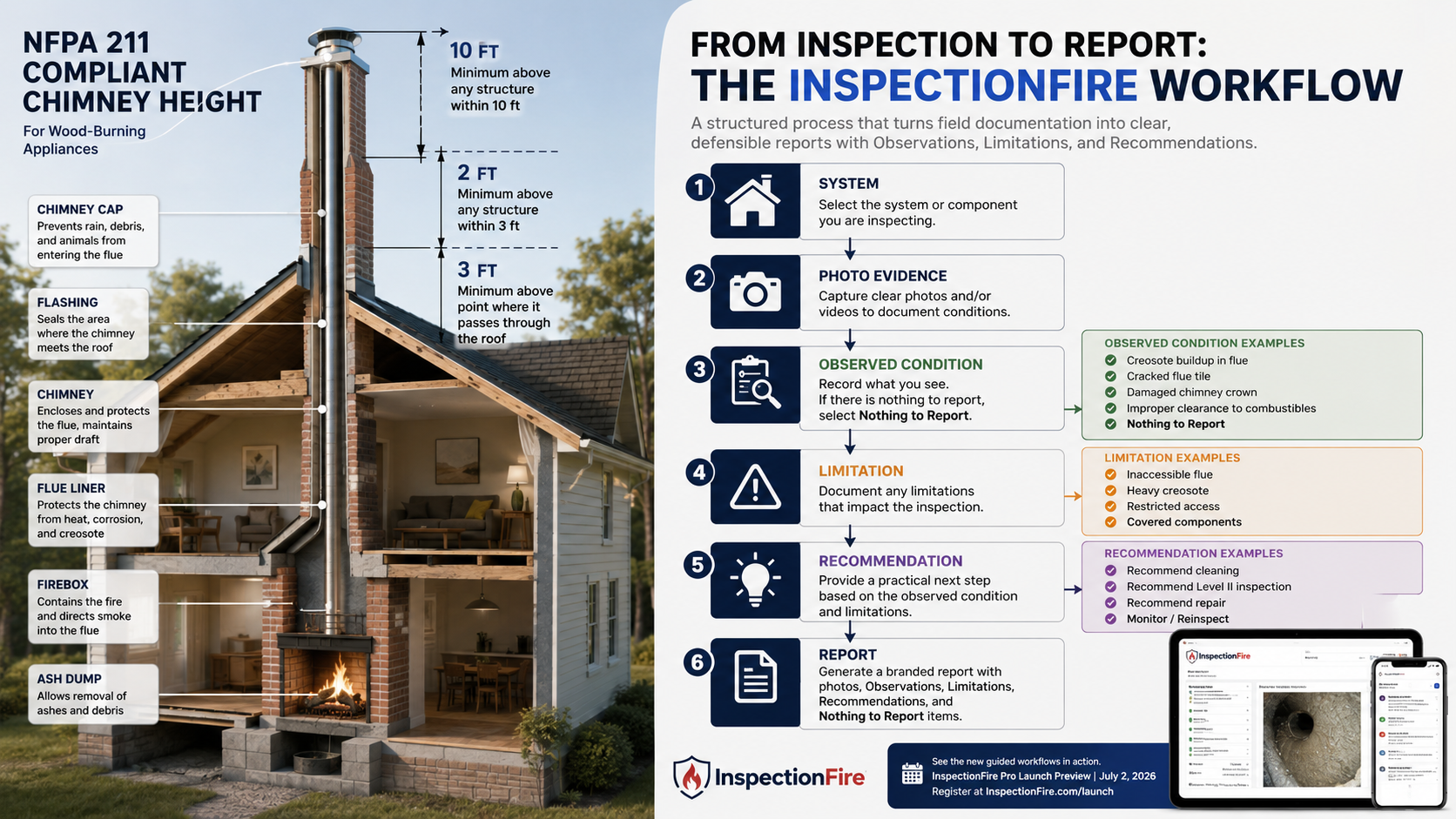
How InspectionFire Supports Better Photo Documentation
InspectionFire is built around the idea that inspection documentation should be organized before the report is generated.
The app is designed for chimney, fireplace, venting, and home inspection professionals who need guided workflows, organized photos, observations, recommendations, and professional PDF output.
For photo documentation, the important issue is not simply whether the software can hold images.
The issue is whether the software helps the inspector preserve context.
InspectionFire is intended to support:
- system-based documentation;
- guided inspection workflows;
- photo organization;
- observations tied to report sections;
- image and video evidence tied to observed conditions;
- consistent language across technicians;
- limitations and recommendations documented in the report;
- professional PDF output;
- Nothing to Report where no reportable observed condition exists.
That workflow matters because reports may be reviewed long after the inspection is complete. The client may remember the conclusion, but the report has to preserve the reasoning.
A clear photo documentation workflow helps the report answer the questions that matter:
- What system does this photo belong to?
- Where was this condition observed?
- What does the photo show?
- Is this a reportable observed condition or Nothing to Report?
- What limitation affects the conclusion?
- What recommendation follows?
Those are not formatting questions.
They are professional documentation questions.
Bottom Line
A chimney inspection photo is useful only when it is connected to the inspection record.
The photo should identify the system, location, observed condition, limitation, and recommendation it supports.
A report with fewer well-labeled, well-connected photos may be stronger than a report with dozens of unlabeled images.
The goal is not more pictures.
The goal is clearer evidence.
That is why chimney inspection software should not treat photos as attachments at the end of the job. Photos should be part of the workflow from the beginning.
Because in professional chimney inspection reporting, the picture is not the conclusion.
The documentation is.
See the Difference. Schedule a Walkthrough.
InspectionFire Pro is being previewed on Thursday July 2, 2026, from 3–4 PM MST. The preview is a practical opportunity to look at how guided workflow, photo documentation, camera evidence, observations, limitations, recommendations, and report generation fit together in one professional inspection system.

Join us to see the newest updates to the InspectionFire chimney inspection workflow.
July 2nd, 2026
3-4pm MST
FAQ
Is a photo enough to document a chimney inspection observation?
No. A photo may support an observation, but it should be tied to the correct system, location, observed condition, limitation, and recommendation. Without that context, the photo may be unclear or misleading.
What should chimney inspection photos include in the report?
A useful chimney inspection photo should identify what system it belongs to, where the condition was observed, what the image shows, why it matters, and what recommendation follows.
What does “Nothing to Report” mean in a chimney inspection workflow?
“Nothing to Report” should mean the section was included and observed within the applicable scope, but no reportable observed condition was documented. It should not be used for areas that were inaccessible, excluded, limited, or not applicable.
Should limitation photos be included in chimney inspection reports?
Yes, when they help explain why an area could not be evaluated. Examples include blocked access, unsafe roof conditions, concealed chase interiors, debris, offsets, or camera-travel limitations.
Are camera photos required for a Level II chimney inspection?
Level II inspections commonly involve internal image scanning or comparable visual examination where applicable and possible. The report should document what was scanned, what was not scanned, and any limitation that affected the examination.
Can a chimney camera replace inspector judgment?
No. A chimney camera captures visual evidence. The inspector still has to interpret the evidence, document limitations, state observations, and make recommendations.
Why is photo organization important for multi-technician chimney companies?
Photo organization helps keep reports consistent across technicians. It also reduces office-review problems because photos are tied to the correct system, observation, limitation, and recommendation instead of being uploaded as a disconnected batch.
Can home inspectors use fireplace photos in a general home inspection report?
Yes, but the report should not imply that a full chimney inspection was performed unless that service was actually included. The report should state what was visible, what was not evaluated, and when further chimney/fireplace evaluation is recommended.
What is the difference between a photo dump and photo documentation?
A photo dump is a collection of images with little explanation. Photo documentation connects each image to the system, location, observed condition, limitation, and recommendation.