
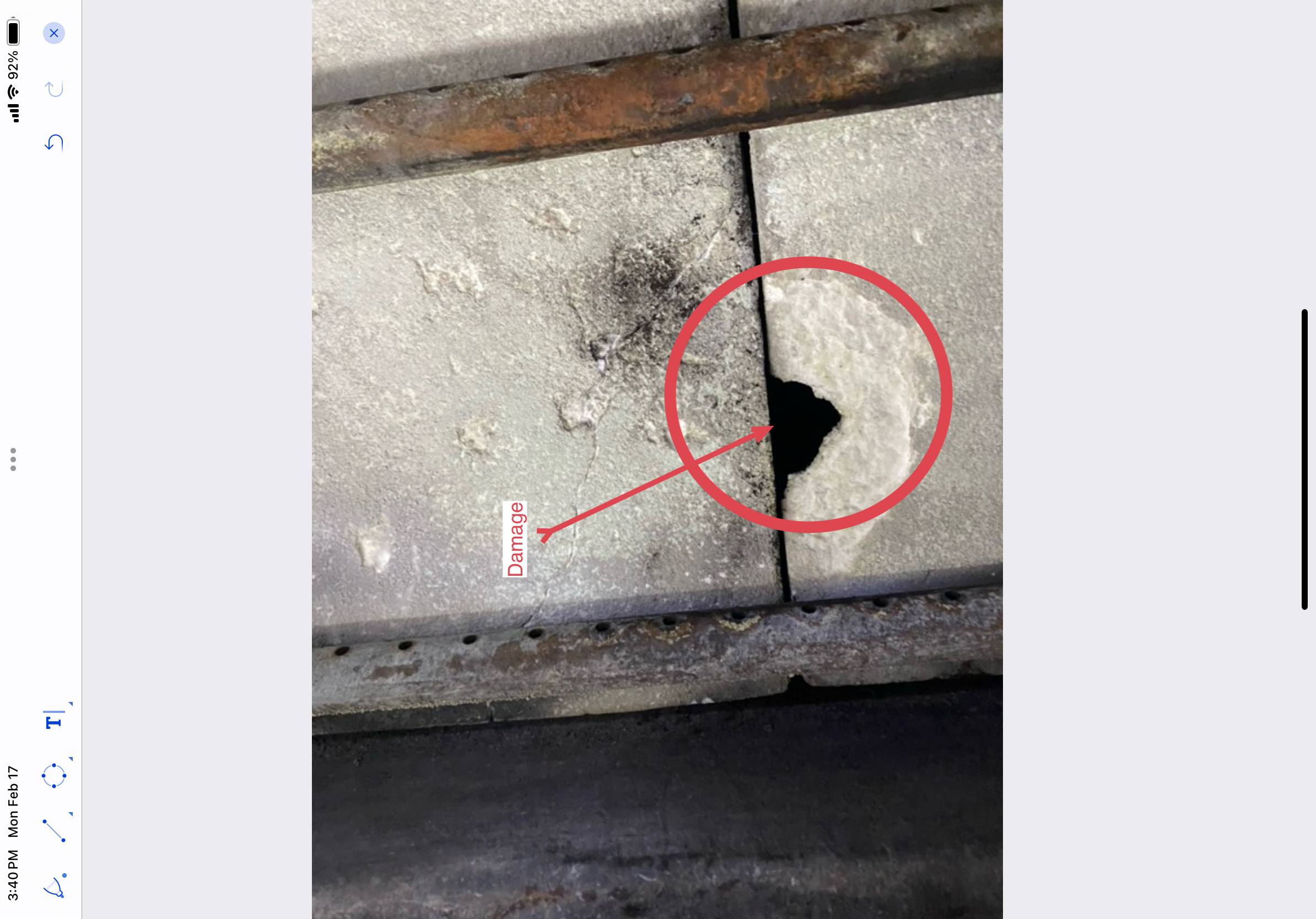
A Level II chimney inspection report is not just a form. It is a professional record of what was inspected, what was accessible, what was observed, what could not be verified, and what should happen next.
That distinction matters.
A chimney company may use the report to explain safety concerns to a homeowner. A home inspector may use it to support a referral to a chimney or fireplace specialist. A real estate client may use it during a transaction. An insurance adjuster, attorney, property manager, or future contractor may review it months or years later.
That means Level II chimney inspection software should do more than help an inspector check boxes and export a PDF. It should help the inspector build a clear, organized, evidence-based record.
A Level II Report Should Begin With the Scope
The first job of a good inspection report is to define the inspection.
A Level II chimney inspection is typically associated with changed conditions, property transfer, relining, appliance change, suspected damage, fire events, weather events, seismic events, operating malfunctions, or situations where a Level I inspection is not enough to determine serviceability.
Software should help the inspector clearly record why the inspection was performed.
Examples include:
- Property sale or transfer
- Appliance replacement or fuel change
- Prior chimney fire or suspected overheating event
- Relining or liner replacement evaluation
- Reported performance problem
- Storm, impact, water, or seismic concern
- Annual inspection upgraded because conditions could not be adequately evaluated at Level I
The report should not leave this context vague. A sentence such as “chimney inspection performed” does not tell the reader enough. A better report identifies the reason for the inspection and the system or systems included.
The Software Should Identify Each System Separately
Many properties have more than one fireplace, chimney, appliance, vent, or flue. A report becomes confusing quickly when those systems are not separated.
A professional chimney inspection app should allow the inspector to document each system as its own record, including:
- Appliance or fireplace type
- Fuel type
- Chimney or vent type
- Location in the building
- Connected appliances
- Flue designation
- Exterior chimney or chase location
- Inspection level
- Whether the system was active, inactive, abandoned, inaccessible, or not included
This matters because recommendations should be tied to the correct system. If a house has a wood-burning masonry fireplace in the living room, a gas fireplace in the primary bedroom, and a furnace vent in the mechanical room, the report should not blur those findings into one general chimney section.
The reader should be able to understand exactly which system was inspected and which finding belongs to that system.
Access and Limitations Must Be Documented
A Level II inspection depends heavily on access. The inspector may need to evaluate accessible portions of the chimney, fireplace, appliance, connector, attic, crawlspace, basement, exterior, roof area, and internal flue surfaces.
But access is not always available.
Common limitations include:
- Unsafe roof access
- Snow, ice, steep pitch, fragile roofing, or unsafe ladder placement
- Locked rooms or inaccessible attic/crawlspace entries
- Finished wall or ceiling areas concealing portions of the system
- Insert, stove, or appliance components that cannot be removed within the agreed scope
- Severe offsets, obstructions, debris, or dimensions preventing complete camera travel
- Weather conditions limiting exterior or rooftop evaluation
- Occupant or client restrictions
Software should not treat limitations as afterthoughts. It should force the inspector to document them in the proper system section, explain why access was limited, and describe how that limitation affects the conclusions.
A report that fails to document limitations can imply that a condition was verified when it was not.
Camera Evidence Should Be Connected to the Report
For Level II work, camera documentation is not simply a marketing upgrade. The internal condition of the chimney or flue is often the part of the system that cannot be reliably evaluated from the firebox opening or chimney top alone.
Good chimney inspection software should help connect camera evidence to the written report.
At minimum, the software should support:
- Photos or still frames from camera footage
- Captions explaining what the image shows
- Location references, such as upper flue, smoke chamber, offset, connector, crown area, or appliance transition
- Direction of view when relevant
- Notes about whether the scan was complete or limited
- Clear identification of defects, obstructions, cracks, gaps, corrosion, missing mortar, damaged liners, improper transitions, or abandoned openings
The point is not to overwhelm the client with every image collected. The point is to preserve enough evidence to support the professional conclusion.
If the report says a liner is cracked, the photo should make the observation understandable. If the report says the scan was limited by debris, offsets, or inaccessible configuration, the report should say and show that clearly.
Measurements Belong in the Workflow, Not in the Inspector’s Memory
A strong Level II report often depends on measurements.
Software should make it easy to capture measurements in the field while the inspector is standing at the system, not later at a desk from memory.
Useful measurements may include:
- Fireplace opening width and height
- Hearth extension dimensions
- Mantel and combustible trim clearances
- Firebox depth
- Smoke chamber height or condition notes
- Flue dimensions
- Chimney height above roof and relation to nearby roof surfaces
- Connector pipe diameter, rise, run, slope, and material
- Appliance nameplate data
- Clearance observations in accessible attic, crawlspace, or mechanical areas
Not every inspection requires the same measurements, but the software should guide the inspector toward the measurements that matter for the system being evaluated.
Generic forms often fail here because they provide a blank field instead of a workflow. A chimney-specific system should guide the inspector based on system type, fuel type, appliance type, and inspection level.
The Report Should Separate Observations From Recommendations
Professional inspection reports are strongest when they separate what was observed from what is recommended.
An observation describes the condition.
A recommendation explains the next action.
For example:
Observation: “The clay flue liner showed visible cracking at the upper third of the flue.”
Recommendation:
- “Do not use the fireplace until it has been repaired, relined if applicable, or issues have been bypassed with suitable appliances and venting components.“
- “Do not use the fireplace until the system is evaluated and repaired by a qualified chimney professional. Repair options should be based on the fireplace type, flue dimensions, system configuration, and applicable manufacturer or listing requirements.”
That structure is clearer than simply writing “needs repair.”
Level II chimney inspection software should help maintain that distinction. It should support condition notes, safety implications, recommendations, and limitation language without forcing the inspector to rewrite the same paragraphs after every inspection.
The Software Should Preserve Professional Judgment
Software should not replace the inspector’s judgment. It should support it.
A good chimney inspection app gives the inspector structure, but it should still allow the professional to explain unusual configurations, limitations, conflicts, or complex conditions.
Examples include:
- Factory-built fireplaces with missing labels
- Obsolete appliances with unavailable parts
- Improper field modifications
- Chimneys serving multiple appliances
- Prior repairs that cannot be verified
- Inaccessible chase interiors
- Conflicts between visible installation conditions and manufacturer instructions
- Situations where further destructive evaluation may be required
The best reports are neither vague nor overconfident. They state what is known, what is not known, and what action is recommended based on the information available.
Generic Inspection Software Usually Misses Chimney-Specific Logic
Many general inspection apps can collect photos, generate PDFs, and create checklists. That may be enough for simple property-condition documentation, but chimney and fireplace inspections involve specialized systems.
A chimney-specific report should account for:
- Masonry chimneys
- Factory-built fireplaces
- Wood stoves
- Inserts
- Gas fireplaces
- Pellet appliances
- Furnace and boiler vents
- Connectors
- Liners
- Flue sizing considerations
- Combustion air concerns
- Hearth and clearance issues
- Manufacturer instructions
- Listing limitations
- NFPA 211-informed inspection levels
A generic app may help capture data. A chimney inspection system should help organize that data into a professional report that reflects the way chimney, fireplace, and venting systems are actually inspected.
What the Final Report Should Make Clear
A Level II chimney inspection report should answer several basic questions for the reader:
- What system was inspected?
- Why was this level of inspection performed?
- What portions of the system were accessible?
- What portions were not accessible?
- What camera or internal inspection evidence was collected?
- What conditions were observed?
- What safety, performance, installation, or documentation concerns were identified?
- What recommendations were made?
- What should not be used until corrected or further evaluated?
- What remains unknown because of access, scope, or system limitations?
If the report does not answer those questions, it may still look professional, but it may not be useful when the decision becomes important.
How InspectionFire Approaches Level II Documentation
InspectionFire is built for chimney, fireplace, hearth, and venting professionals who need structured inspection workflows, field evidence capture, and professional PDF output.
The goal is not simply to make the report look better. The goal is to help the inspector capture the right information in the field and organize it in a way that is clear, consistent, and defensible.
That includes guided workflows, system-based documentation, photo and measurement capture, report language, sample Level II report structures, and tools that support chimney-specific inspection work.
When paired with proper camera equipment, the report becomes stronger because the written findings and visual evidence support each other. The camera gathers the proof. The software organizes it. The inspector applies professional judgment.
Final Thought
A Level II chimney inspection report should not be built from memory after the job. It should be built from structured field documentation, clear limitations, system-specific observations, camera evidence, measurements, and professional recommendations.
That is what chimney inspection software should support.
A PDF is only the final output. The real value is the workflow that creates it.
FAQ
What is Level II chimney inspection software?
Level II chimney inspection software is a reporting system designed to help inspectors document the scope, access, observations, camera evidence, measurements, limitations, and recommendations associated with a Level II chimney or fireplace inspection.
Does Level II chimney inspection software replace the inspector?
No. Software does not replace professional judgment, training, or field experience. It should support the inspector by organizing the workflow, preserving evidence, and producing a clearer report.
Should a Level II chimney inspection include camera documentation?
NFPA 211 requires that for a Level II inspection to be completed an internal examination of the chimney or flue using video scanning or similar means shall be performed. If a full scan cannot be completed, the reason should be documented in the report.
What should a Level II chimney inspection report include?
A strong report should identify the system, reason for the inspection, inspection level, accessible and inaccessible areas, observed conditions, photo or camera evidence, measurements where relevant, limitations, safety concerns, and recommendations.
Can InspectionFire Level II chimney inspection software document other inspection and service types?
Yes, our InspectionFire chimney inspection software is commonly used to document Level I inspections as well as standard service calls, annual service, troubleshooting, repair, installation, and replacement work. It is built so that technicians in the field can document the work they perform whatever its scope. Other software systems may or may not allow that flexibility.
Can home inspectors perform Level II chimney inspections?
Some home inspectors add chimney inspection services after obtaining appropriate training, equipment, and reporting systems. Others refer Level II chimney inspection work to chimney or fireplace specialists. Either way, the referral or report should clearly identify the inspection scope and its limitations.
Why is chimney-specific software better than a generic inspection checklist?
Generic software can document photos and notes, but chimney-specific software is better suited to system types, inspection levels, flue evidence, appliance data, manufacturer instructions, and chimney/fireplace-specific report language.
What is the difference between inspection software and camera equipment?
Camera equipment captures visual evidence inside the chimney, flue, smoke chamber, vent, or other accessible areas. Inspection software organizes the findings, photos, measurements, limitations, and recommendations into a professional report.
Should the report say a system is “NFPA compliant”?
Professional we would recommend not to say “NFPA compliant”. Use caution. A report can be NFPA 211-informed or performed with reference to NFPA 211 inspection levels, but broad “compliance” language can be misleading unless the inspection scope, applicable standard, and conclusions are stated precisely.
Join Us: July 2nd, 2026 @ 3-4pm MST
to see the newest updates to the InspectionFire chimney inspection workflow.