A chimney inspection report should not be treated as the inspection.
The report is the final deliverable. It is the record of what was observed, what was not observed, what was limited, what was excluded, what was not applicable, and what was recommended.
But the report is not where professional judgment begins.
That distinction matters.
Many inspection tools focus heavily on the final PDF. They promise cleaner formatting, faster reports, photo sections, templates, signatures, and client-ready documents. Those features are useful. But they do not solve the deeper problem if the field workflow itself is weak.
A professional chimney inspection report is only as strong as the inspection process that created it.
If the technician missed the system configuration, skipped an access limitation, failed to connect the photo to the finding, or selected vague language without explaining the recommendation, a polished PDF does not fix the underlying problem.
It may only make the problem look cleaner.
That is why chimney inspection software should guide the inspection before it generates the report.
The Report Is the Output, Not the Workflow
A PDF report is an output.
It is not the inspection process.
A strong inspection workflow should answer the important questions before the report is ever generated:
- What system is being inspected?
- What appliance, fireplace, chimney, vent, or flue is involved?
- What inspection level or service scope applies?
- Why is the inspection being performed?
- Which areas are applicable?
- Which areas are included?
- Which areas are excluded?
- Which areas are limited?
- Which areas are inaccessible?
- Which areas are not applicable?
- What evidence was captured?
- What finding does that evidence support?
- What recommendation follows from the finding?
If those questions are not answered during the inspection, the final report becomes a reconstruction exercise.
That is where errors occur.
The technician tries to remember what a photo showed. The office tries to interpret field notes. The company tries to clean up the language after the fact. The report gets finished, but the workflow was not controlled.
That is not the same as disciplined documentation.
Generic Forms Can Create a False Sense of Completion
A generic form can make an inspection look complete because every field has a box.
But boxes do not create professional judgment.
A checkbox can say that the firebox was inspected. It may not explain visibility, access, condition, limitations, measurements, combustible-clearance concerns, or what recommendation follows.
A photo upload field can hold images. It may not tie those images to the right system, finding, location, limitation, or recommendation.
A signature field can confirm that someone signed. It does not prove that the report adequately explained what was included or excluded.
The issue is not whether generic inspection software can produce a report.
The issue is whether the workflow reflects the way chimney, fireplace, venting, and fuel-burning systems actually need to be evaluated.
A chimney inspection is not a generic property checklist.
It often involves multiple systems, multiple flues, concealed construction, access limitations, manufacturer instructions, code-informed observations, standard-informed inspection levels, image scanning, measurements, and recommendations that may affect safety, use, repair planning, real estate decisions, or insurance review.
That requires more than a clean form.
It requires a guided workflow.
Photos Need Context
Photos are useful only when they are connected to meaning.
A report full of photos may still fail if the reader cannot tell:
- where the photo was taken;
- which system or flue it belongs to;
- whether it shows a defect, limitation, measurement, or general condition;
- what the inspector concluded from the photo;
- what recommendation follows;
- whether the photo represents the entire condition or only one view;
- whether additional areas were inaccessible or not visible.
This is especially important with chimney cameras.
Camera evidence can be powerful, but camera footage is not self-explanatory. A homeowner, real estate agent, insurer, attorney, or AHJ may not know what they are looking at without clear report language.
Chimney inspection software should help the inspector connect evidence to the inspection record.
A photo should not merely be stored.
It should support a finding.
A finding should support a recommendation.
A recommendation should be tied to the scope and limitations of the inspection.
That chain is what gives the report value.
Recommendations Should Not Float Free From Findings
One common reporting weakness is the disconnected recommendation.
For example:
“Recommend repair by qualified contractor.”
That may be directionally correct, but it is weak if the report does not explain what condition led to that recommendation.
A stronger workflow connects the pieces:
- Observed condition.
- Supporting evidence.
- Applicable limitation or access note.
- Risk or performance concern.
- Recommended action.
- Urgency or use limitation where appropriate.
- Further evaluation when the observed condition exceeds the inspection scope.
The report should not make the reader guess why a recommendation was made.
If the issue is a cracked flue liner, damaged factory-built fireplace component, improper connector, blocked vent, missing listing label, unverified clearance, or inaccessible chase cavity, the report should say so clearly.
The recommendation should be traceable back to the observation.
That traceability should be built into the software workflow before the report is generated.
Inspection Levels Require More Than a Label
Selecting “Level I” or “Level II” is not enough.
The report needs to show what that inspection level meant for the actual system and the actual conditions present.
For a Level I inspection, the report should make clear which applicable portions were inspected within the appropriate access threshold and which issues, if any, caused the inspector to recommend further evaluation.
For a Level II inspection, the report should identify the reason for the Level II inspection, the systems and flues included, the accessible portions examined, and any areas that could not be evaluated because of access, safety, construction, obstruction, or scope limitation.
The inspection level should not operate as a decorative label at the top of the report.
It should control the workflow.
That means the software should help the inspector document:
- reason for inspection;
- system type;
- fuel type;
- appliance type;
- chimney or vent type;
- access conditions;
- accessible areas;
- readily accessible areas;
- inaccessible areas;
- limitations;
- image-scanning status;
- photo evidence;
- findings;
- recommendations.
This is where chimney-specific software matters.
A generic form may let the inspector select “Level II.” A disciplined chimney inspection workflow should help the inspector document what was actually evaluated under that Level II scope.
Standardization Does Not Mean Removing Professional Judgment
Some inspectors resist guided workflows because they assume structure will make the inspection less professional.
That concern is understandable, but it misunderstands the purpose of a good workflow.
A guided inspection system should not replace professional judgment.
It should protect it.
The software should help ensure that the inspector considers the applicable sections, documents limitations, captures relevant evidence, and uses clear report language. The inspector still makes the professional determination. The software should not pretend to inspect the system.
The goal is not to force every inspection into the same conclusion.
The goal is to reduce preventable variation in the process.
Two technicians may inspect different systems, under different conditions, and reach different findings. That is normal.
The problem is when two technicians inspect similar systems under similar conditions and produce radically different reports because one remembered the workflow and the other did not.
That is an operational problem.
It is also a professional-risk problem.
The Office Should Not Have to Rebuild the Inspection
Many chimney companies rely on office review.
That can be valuable. A second set of eyes can catch spelling issues, formatting problems, missing photos, unclear wording, or inconsistent recommendations.
But office review should not become field reconstruction.
If the office has to ask:
- Which fireplace was this photo from?
- Was this the upstairs or downstairs flue?
- Was the attic inspected?
- Did the technician scan the entire flue?
- Was the scan blocked?
- Was this limitation explained to the client?
- Was the recommendation tied to the finding?
- Did the customer sign the correct acknowledgment?
- Was this a Level I or Level II inspection?
Then the field workflow failed to preserve enough information.
A better software workflow should collect the information while the inspector is still in the field, while the system is still in front of them, and while the context is still fresh.
The office can then review the report for clarity and professionalism instead of trying to reconstruct the inspection from scattered notes, disconnected photos, and memory.
What Should Happen Before the PDF Is Generated
Before a chimney inspection report becomes a PDF, the software should help the inspector verify the basic structure of the record.
At minimum, the workflow should confirm:
- customer and property information;
- inspector and company information;
- system count;
- appliance, fireplace, chimney, vent, or flue identification;
- inspection level or service scope;
- reason for inspection;
- access conditions;
- included sections;
- excluded sections;
- limitations;
- inaccessible areas;
- not-applicable sections;
- required photos or evidence;
- findings;
- recommendations;
- summary language;
- customer acknowledgment or signature when used;
- final review before submission.
That final review matters.
A PDF should not be generated simply because the inspector reached the end of the form.
It should be generated because the inspection record is coherent enough to support the deliverable.
Why This Matters for Multi-Technician Companies
A single experienced inspector can often work around weak software because they carry the workflow in their head.
That does not scale well.
As soon as a company adds technicians, the workflow has to become more explicit.
The company needs a repeatable way to control:
- what gets documented;
- how limitations are recorded;
- how photos are attached;
- how recommendations are worded;
- how inspection levels are identified;
- how reports are reviewed;
- how company language stays consistent;
- how the office knows what happened in the field.
Without that structure, the report quality depends too heavily on the individual technician’s habits.
That is risky.
A guided inspection system helps convert company standards into field behavior.
It does not make every inspector identical. It gives every inspector the same professional framework.
Why This Matters for Home Inspectors Adding Chimney Services
Home inspectors considering chimney inspections face a separate issue.
A general home inspection report may include fireplace and chimney observations, but that does not automatically make it a Level II chimney inspection.
A chimney inspection service needs its own defined scope, training, equipment, language, limitations, and reporting workflow.
If a home inspector adds chimney inspections as an ancillary service, the software should help separate:
- general visible fireplace observations;
- referral language;
- limited-scope review;
- Level I chimney inspection;
- Level II chimney inspection;
- camera-supported documentation;
- conditions requiring further evaluation by a qualified chimney or fireplace specialist.
That separation protects the inspector and makes the report clearer for the client.
The goal should not be to make a general home inspection report look more technical than it is.
The goal should be to document the correct scope honestly and professionally.
Why This Matters for Chimney Companies
Chimney companies face a different version of the same problem.
Many chimney companies already have technical knowledge and equipment. Their weakness is often not the inspection itself. The weakness is inconsistent documentation.
One technician writes detailed reports. Another writes short notes. One captures photos in the right location. Another uploads a batch of images with no explanation. One documents limitations clearly. Another leaves them implied.
That inconsistency becomes visible when reports are reviewed by clients, property managers, Realtors, attorneys, insurers, AHJs, or other professionals.
A disciplined workflow makes the company’s standard more durable.
It helps ensure that the report reflects the inspection rather than the writing habits of whichever technician was assigned that day.
How InspectionFire Pro Fits This Direction
InspectionFire Pro is being developed around the idea that chimney inspection software should guide the work before it generates the deliverable.
The value is not simply that the platform can produce a PDF.
The value is that the workflow can help inspectors capture the right information, organize photos and observations, document limitations, maintain consistency, and create reports that better reflect the actual inspection performed.
That matters in professional environments where inspection documentation may be reviewed long after the appointment is over.
The strongest reports are not created by formatting alone.
They are created by a field process that preserves context.
InspectionFire Pro is designed for inspectors and companies that want that process built into their reporting system.
See the Workflow Before Launch
InspectionFire is hosting an InspectionFire Pro Launch Preview on Wednesday, July 2, 2026, at 3:00 PM MST.
The preview is intended for fireplace, chimney, venting, and inspection professionals who want to see the new mobile app and web platform before the full launch.
If your company is evaluating chimney inspection software, this is a useful time to look past the final PDF and ask the more important question:
Does the software guide the inspection process well enough to support the report?
That is the question that matters.
Bottom Line
A chimney inspection report should be more than a clean PDF.
It should be the output of a disciplined inspection workflow.
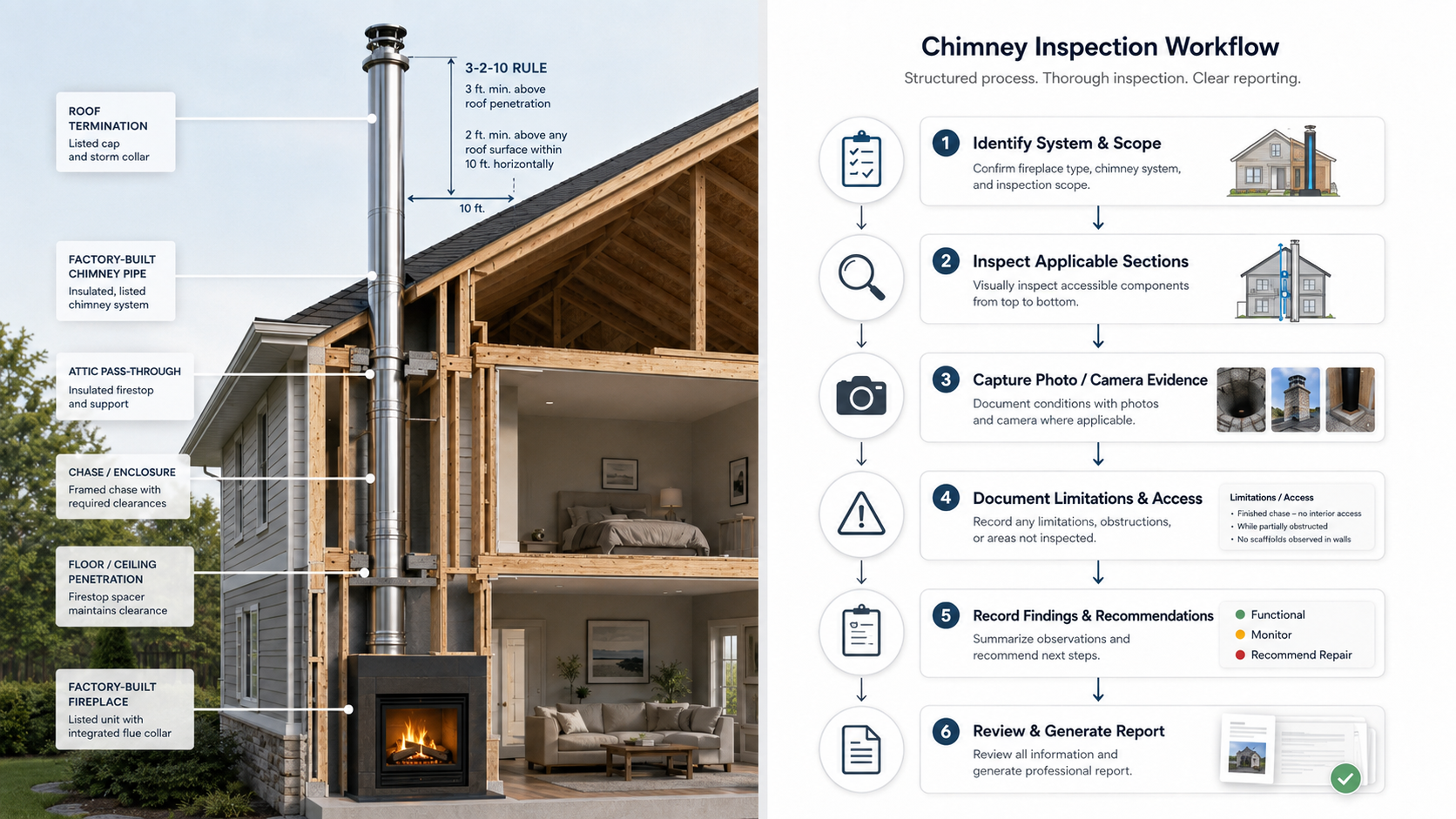
The software should help the inspector identify the system, define the scope, document access, capture evidence, connect findings to recommendations, and preserve limitations before the report is generated.
That is the difference between report writing software and chimney inspection software.
A report writer helps produce a document.
A guided inspection system helps preserve the inspection.
FAQ
What is guided chimney inspection software?
Guided chimney inspection software helps the inspector move through a structured workflow for documenting the system, inspection level, access conditions, photos, findings, limitations, and recommendations before the final report is generated.
Is chimney inspection software the same as report writing software?
No. Report writing software focuses primarily on producing the final document. Chimney inspection software should also support the field workflow that creates the report, including evidence capture, inspection scope, limitations, and system-specific documentation.
Why is the workflow before the PDF important?
The workflow before the PDF determines whether the report accurately reflects the inspection. If the inspector misses access limitations, system identification, photo context, or recommendations in the field, a polished PDF may still be incomplete or misleading.
Can generic inspection software be used for chimney inspections?
Generic inspection software may be able to produce a report, but chimney, fireplace, venting, and fuel-burning appliance inspections often require more specialized workflows, language, evidence capture, and limitation tracking than a generic checklist provides.
How does guided software help multi-technician companies?
Guided software helps reduce variation between technicians by giving each inspector the same documentation framework. It helps standardize how findings, photos, limitations, inspection levels, and recommendations are captured.
Does software replace inspector judgment?
No. Software should not replace training, standards, field experience, or professional judgment. It should support the inspector by structuring the documentation process and helping preserve the inspection record.
Why do photos need to be connected to findings?
Photos without context can confuse the reader. A useful inspection report should explain where the photo was taken, what condition it shows, what system it relates to, and what recommendation follows.
Why should Level I and Level II inspections be handled differently in software?
Level I and Level II inspections involve different scope and access considerations. The software should help document why the inspection level applies, which areas were included, and which areas were limited, inaccessible, excluded, or not applicable.